Tagged: command-line
asdf: Extendable version manager #
If your work involves multiple languages and multiple tools for managing versions, check out asdf, an extendable version manager that provides a single consistent interface for managing them all:
# List all installed ruby versions
❯ asdf list ruby
1.9.3-p545
2.1.2
2.2.3
2.2.4
2.2.5
jruby-9.1.6.0

# Install a new ruby version
❯ asdf install ruby 2.3.3

# List available nodejs versions to install
❯ asdf list-all nodejs

# Install a new nodejs version
❯ asdf install nodejs 7.7.2
I've been using asdf as my primary version manager for Ruby and Node for a few weeks and am really liking it.
h/t Adam
A CLI for Amazon Athena #
I've been enjoying Amazon Athena to analyze our application event data.
In case you haven't played with it yet, Athena allows you to query data in S3 using SQL. My only complaint so far is having to use the web interface to manage schemas and run queries. Since Amazon offers a JDBC driver for Athena, I decided to build my first JRuby app - a command line interface for Athena catalogs.
You can run queries:
❯ cat queries/count-by-port.sql
SELECT COUNT(*) AS count, elb_name
FROM sampledb.elb_logs
GROUP BY elb_name
ORDER BY count DESC
LIMIT 10;

❯ athena query queries/count-by-port.sql
COUNT  | ELB_NAME
-------|-------------
151901 | elb_demo_006
151886 | elb_demo_009
151753 | elb_demo_001
151284 | elb_demo_002
151062 | elb_demo_004
150503 | elb_demo_008
149934 | elb_demo_005
149122 | elb_demo_007
148761 | elb_demo_003
manage schemas,
❯ athena table show sampledb.elb_logs
CREATE EXTERNAL TABLE `sampledb.elb_logs`(
  `request_timestamp` string COMMENT '',
  `elb_name` string COMMENT '',
  `request_ip` string COMMENT '',
  `request_port` int COMMENT '',
  `backend_ip` string COMMENT '',
  `backend_port` int COMMENT '',
  `request_processing_time` double COMMENT '',
  `backend_processing_time` double COMMENT '',
  `client_response_time` double COMMENT '',
  `elb_response_code` string COMMENT '',
  `backend_response_code` string COMMENT '',
  `received_bytes` bigint COMMENT '',
  `sent_bytes` bigint COMMENT '',
  `request_verb` string COMMENT '',
  `url` string COMMENT '',
  `protocol` string COMMENT '',
  `user_agent` string COMMENT '',
  `ssl_cipher` string COMMENT '',
  `ssl_protocol` string COMMENT '')
ROW FORMAT SERDE
  'org.apache.hadoop.hive.serde2.RegexSerDe'
WITH SERDEPROPERTIES (
  'input.regex'='([^ ]*) ([^ ]*) ([^ ]*):([0-9]*) ([^ ]*):([0-9]*) ([.0-9]*) ([.0-9]*) ([.0-9]*) (-|[0-9]*) (-|[0-9]*) ([-0-9]*) ([-0-9]*) \\\"([^ ]*) ([^ ]*) (- |[^ ]*)\\\" (\"[^\"]*\") ([A-Z0-9-]+) ([A-Za-z0-9.-]*)$')
STORED AS INPUTFORMAT
  'org.apache.hadoop.mapred.TextInputFormat'
OUTPUTFORMAT
  'org.apache.hadoop.hive.ql.io.HiveIgnoreKeyTextOutputFormat'
LOCATION
  's3://athena-examples-us-east-1/elb/plaintext'
TBLPROPERTIES (
  'transient_lastDdlTime'='1480278335')
list and rebuild partitions, and more.
Setup instructions and full usage are in the GitHub repository.
jq is sed for JSON #
A fantastic intro to jq, a tool for processing JSON that has transformed the way I work over the last few years.
Nomad - world-class command line utilities for iOS development #
I don't know if anybody ships like Mattt. Nomad continues a long line of work to make Apple's tools more approachable for those of us who reside in the shell:
Nashville is named after the eponymous Capital of Country Music (and Tennesee), home of the Grand 'Ole Opry and the Country Music Hall of Fame and Museum. It's part of a series of world-class command-line utilities for iOS development, which includes Cupertino (Apple Dev Center management), Shenzhen (Building & Distribution), Houston (Push Notifications), Venice (In-App Purchase Verification), and Dubai (Passbook pass generation).
Flint: lint your project for sources of contributor friction
I wrote previously on the benefits of bootstrapping consistency. Predictable scripts for automating setup and running tests greatly reduce the friction for newcomers to a project.
Recently, I've jumped back into some of my older projects and immediately felt the pain of not having bootstrap or test scripts to get up and running. Wanting a way to quickly check a project for these missing scripts and (other items that help reduce contributor friction), I wrote Flint as a small Bash script. Here's what it does:
While Bash was a good fit for the initial version, I have some ideas for Flint that really demand a higher level language:
- Open an issue in a GitHub repository. I'd like to run Flint in a project and just have it open an issue in the repo with each of the lint errors as TODO tasks in the issue body.
- Add missing files based on templates. I want to ship some default licenses (or pull them from choosealicense.com), and just add them to the project automatically. Boilerplate README, and CONTRIBUTING guides would be a logical addition, too.
Rewriting in Go
Ruby is my primary language, and I've written plenty of CLI apps in Ruby, but I thought I'd give Go a shot for this one, primarily for the reasons Mitchell Hashimoto and Jeremy Saenz have written about.
It's still early, but I've enjoyed writing a command line app in Go. Jeremy's cli.go project has captured much of the declarative expressiveness I like about David Copeland's gli CLI framework for Ruby.
Special thanks to Owen and Jeffrey for some helpful code review.
See Flint on GitHub.
Unix shell if statement explained #
Pat Brisbin gives one of the most approachable explanations of the Unix shell's
if statement that I've seen.
if [ "string" != "other string" ]; then
  # same as if test "string" != "other string"; then
fi
Unfortunately, many users come across this usage first and assume the brackets are part of if itself. This can lead to some nonsensical statements.
I will always hold my nose every time I type fi, but I've grown more fond of
shell scripting the last few years.
Rdio-cli does lyrics #
In another dotfile discovery, I ran across makeitpersonal in Artem's dots. makeitpersonal makes it easy to fetch lyrics in plain text using curl. Naturally, I didn't waste time adding this to rdio-cli. By default, it looks up the current track, but you can override artist or song title, the former being quite useful for covers.
$ rdio current
Now playing: That Old Time Feeling / Rodney Crowell / This One's for Him: A
Tribute to Guy Clark

$ rdio lyrics
Sorry, We don't have lyrics for this song yet.

$ rdio lyrics --artist="Guy Clark"

And that old time feeling goes sneakin' down the hall
Like an old gray cat in winter, keepin' close to the wall
And that old time feeling comes stumblin' up the street
Like an old salesman kickin' the papers from his feet

And that old time feeling draws circles around the block
Like old women with no children, holdin' hands with the clock
And that old time feeling falls on its face in the park
Like an old wino prayin' he can make it till it's dark

And that old time feeling comes and goes in the rain
Like an old man with his checkers, dyin' to find a game
And that old time feeling plays for beer in bars
Like an old blues-time picker who don't recall who you are

And that old time feeling limps through the night on a crutch
Like an old soldier wonderin' if he's paid too much
And that old time feeling rocks and spits and cries
Like an old lover rememberin' the girl with the clear blue eyes

And that old time feeling goes sneakin' down the hall
Like an old gray cat in winter, keepin' close to the wall
You can install rdio-cli from Rubygems or from the source on GitHub.
Bootstrapping consistency #
One of the best features of Rails is its consistent project layout.
Thoughtbot recently shared how they use a ./bin/setup script to
bring consistency to the project setup.
Regardless of the
bin/setupfile’s contents, a developer should be able to clone the project and run a single, consistent, reliable command to start contributing.
At GitHub, we use script/bootstrap, but the idea is the same — a consistent
user experience to get from zero to productive on any new project. Whether
I'm writing docs, extending GitHub with service hooks, or
hacking our internal support tools, I know I can just clone the repository and
run script/bootstrap to jump right in. Thanks to a patch from Matt
Emborsky, this works for my dots, too.
We also don't stop with the project bootstrap. Our projects normally have
script/test for running the local test suite, script/cibuild for running
tests on the continuous integration server, as well as the usual
script/server, and script/console scripts where applicable.
As a result, I spend less time thinking what to run and just run.
Contextual TODO list counts in your zsh prompt
One of the nuggets I picked up from Zach Holman's dotfiles was putting a count of my todo.txt items in my right side zsh prompt. That little number now nags me any time I use my terminal.
Then I had the idea of displaying contextual counts for all those TODO, FIXME, and HACK notes we often use in our projects. With some help from Jesse, my dream has come true:
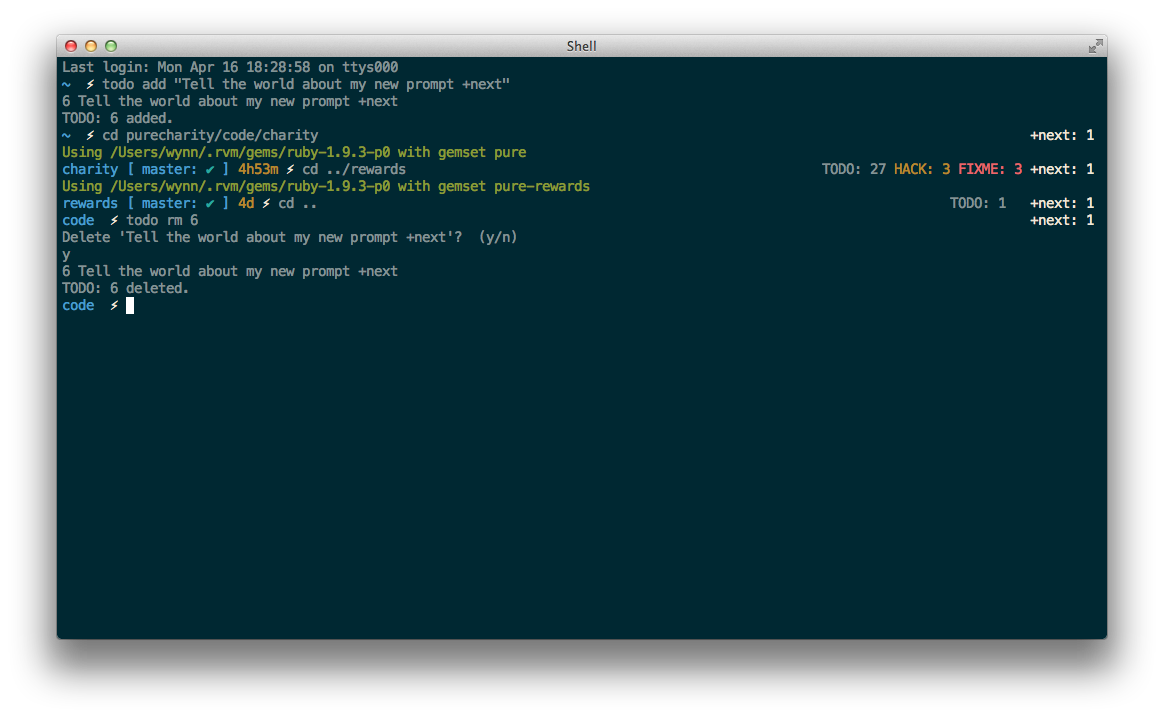
Now, if I'm in a project with any of those custom notes, the counts appear in my right side prompt in addition to my regular personal todo.txt tally. Check the function in my dotfiles repo if you're interested or have ideas on how to improve it.
Command Line Tools for Xcode #
Kenneth Reitz, creator of OSX-GCC-Installer on great news today from Apple:
Today, Apple added a beautiful new package to their official developer tools suite: Command Line Tools for Xcode. It's a 171 MB download that includes all of the tools a Homebrew should ever need. Best of all, it contains the proprietary headers that I couldn't ship myself.
You can download and try it out today. All you need is a free Apple ID.
Official Homebrew support is on the way.
To stave off further questions, yes, you can use the "Command Line Tools for Xcode" package with Homebrew. And we will support it.
— Max Howell (@mxcl) February 16, 2012
Awesome.
Topfunky's beautifully annotated command line prompt #
Geoffrey Grosenbach and Paula Lavalle have collaborated on a beautiful breakdown of Geoffrey's ZSH prompt. If you haven't taken the time to customize your terminal prompt, I highly recommend it. Here's my setup
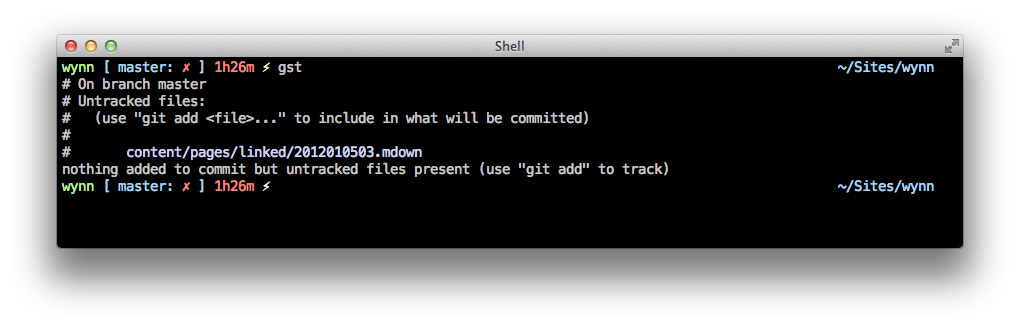
Be sure to check out Steve Losh's guide if you missed it.
Vim + tmux = custom IDE #
Alex Young on stitching together your own development environment with tmux, vim, and other text-mode apps:
The difference between this approach and a traditional IDE is this interface adapts around my current task, and is only limited by the thousands of commands and scripting languages that I have installed.
As a recent command-line Vim convert, I agree. I use tmuxinator to automate the process. I have tmux environments for development projects, blogging, and even GTD with taskpaper.vim.
I'm also anxious to try the upcoming iTerm + tmux integration.